Strange characters in a .txt file? UTF-8, ANSI and Shift_JIS explained
Updated October 13, 2026 · 5 min read · 6 sections
The file opened fine on the old office PC. On your laptop it reads Привет, or a row of �, or café where it should say café. Nothing is broken in the file. The bytes are all there; the program is reading them with the wrong table. Pick the right table and the text comes back, letter for letter.
What an encoding is
A .txt file holds bytes, numbers from 0 to 255. An encoding is the table that says which character each byte, or group of bytes, stands for. For the plain English letters, digits and punctuation, almost every table agrees: a is 61 in hex everywhere. Above 127 they part ways. The word café shows it:
| Text | UTF-8 | Old single-byte code page |
|---|---|---|
| café | 63 61 66 C3 A9 (5 bytes) | 63 61 66 E9 in Windows-1252 (4 bytes) |
| Привет | D0 9F D1 80 D0 B8 D0 B2 D0 B5 D1 82 (12 bytes) | CF F0 E8 E2 E5 F2 in Windows-1251 (6 bytes) |
| テスト | E3 83 86 E3 82 B9 E3 83 88 (9 bytes) | 83 65 83 58 83 67 in Shift_JIS (6 bytes) |
UTF-8 covers every writing system in one table and is what the web runs on; the WHATWG Encoding Standard, which browsers follow, says new formats must use UTF-8 exclusively (encoding.spec.whatwg.org). The old code pages each cover one region, and a file does not say which one it used.
How the strange characters happen
That garbage has a name, mojibake, and its look tells you what went wrong. Below are real results: each word saved in one encoding and opened as another.
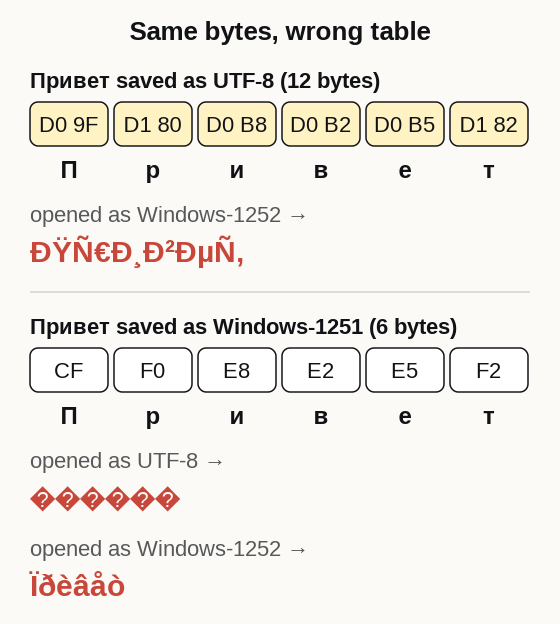
| You see | Saved as | Opened as | Reopen as |
|---|---|---|---|
| Привет | UTF-8 | Windows-1252 | UTF-8 |
| café | UTF-8 | Windows-1252 | UTF-8 |
| テスト | UTF-8 | Windows-1252 | UTF-8 |
| Ïðèâåò | Windows-1251 | Windows-1252 | Windows-1251 |
| ƒeƒXƒg | Shift_JIS | Windows-1252 | Shift_JIS |
| caf� or ������ | an old code page | UTF-8 | the old code page |
My rules of thumb: lots of Ã, Ð or ã means UTF-8 read as a Western code page. Diamonds with a question mark mean an old code page read as UTF-8. Plain question marks ? in place of letters are the bad case: some program already saved the file in an encoding that had no room for those letters and wrote ? instead. That text is gone and no reopening brings it back; look for an older copy.
What "ANSI" really means
Windows calls its old default encoding "ANSI", but that is not one encoding. It is the system's legacy code page, which depends on the language Windows was set up for. Microsoft's own documentation describes the -A ("ANSI") functions as using "the ANSI code page configured on the system" (Microsoft Learn). A file saved as "ANSI" in Moscow and opened on a PC in Texas is read with a different table. Browsers go further: in the WHATWG standard, the labels "latin1" and "ascii" both simply mean Windows-1252.
| Language of the text | Windows ("ANSI") | Also seen |
|---|---|---|
| English, French, German, Spanish, Italian, Portuguese | Windows-1252 | ISO-8859-1 (read as 1252) |
| Russian, Ukrainian, Bulgarian | Windows-1251 | KOI8-R on old Unix systems and mail |
| Japanese | Shift_JIS | EUC-JP on Unix |
| Turkish | Windows-1254 | ISO-8859-9 |
| Arabic | Windows-1256 | ISO-8859-6 |
The BOM: three bytes at the start
A byte order mark is an invisible signature at the very start of a file: EF BB BF for UTF-8, FF FE for UTF-16 little-endian, FE FF for UTF-16 big-endian. The encoding standard treats it as more authoritative than anything else, and it is the most reliable hint a file can give. Older Windows programs and Excel opening a CSV rely on it to recognise UTF-8.
The BOM has a cost. Programs that don't expect it show it as  at the top (EF BB BF read as Windows-1252), and it can break the first header of a CSV import or the first line of a script. My habit: BOM on for files going to Excel or old Windows tools, off for everything else. Windows Notepad itself has saved new files as UTF-8 without a BOM since the Windows 10 version 1903 update, and its Save As dialog still offers ANSI, UTF-16 and UTF-8 with BOM.
How to open an old file correctly
- In the online notepad, use Open file… or drop the file on the sheet. It opens in a new tab; nothing is uploaded.
- Read the notice. A BOM or valid UTF-8 is detected automatically. Otherwise you see Opened as …, the guess made from the page language.
- If the letters look wrong, pick an encoding under Reopen as, starting with the language of the text from the table above. Try the next one if needed; reopening never changes the file.
- When the text reads correctly, Save as .txt. The new file is UTF-8 (with a BOM unless you switch Add BOM off), so the problem does not come back.
Line endings: CRLF and LF
The other invisible difference between text files is how a line ends. Windows uses two bytes, carriage return and line feed (0D 0A, "CRLF"); macOS and Linux use the line feed alone (0A, "LF"). Current editors, including Windows Notepad, read both. Problems show up elsewhere: a ^M at every line end in a Unix tool, a Windows batch file that misbehaves with LF, or a version-control diff where every line changed although nothing did. When saving, choose Line endings: Windows (CRLF) or Mac & Linux (LF) to match where the file is going. Saved with CRLF and a BOM, a⏎b is exactly EF BB BF 61 0D 0A 62.
FAQ
Why does my text file show strange characters?
The file was saved in one encoding and opened in another. The bytes are fine; reopen the file with the right encoding, such as UTF-8, Windows-1251 or Shift_JIS, and the letters come back.
What is the difference between ANSI and UTF-8?
ANSI is Windows' name for the system's old regional code page, for example Windows-1252 in Western Europe. UTF-8 is one encoding that covers every language and is the standard for new files.
Should I save text files with a BOM?
Only when the file goes to Excel or an older Windows program that needs it to recognise UTF-8. Otherwise save without, because some tools show the BOM as .
Can I fix question marks in a text file?
Usually not. Plain ? marks mean a program already replaced letters it could not store, so the original characters are lost; look for an older copy of the file.